
want your emails to land in the inbox
and avoid being marked as spam
Do you want even better email deliverability?
Of course, you do!
Today, I'm going to show you how you can do that!
When we launched Gold Star Pro in 2021, one of our major goals was to help users get the best possible email deliverability for their business.
Your list is important.
You spend a lot of time building it.
And you deserve to land in as many inboxes as you possibly can.
Now a percentage of emails will always land in spam... there is nothing we can do about that.
And while we can't possibly have full control over where the likes of Google and Yahoo put your emails, there are steps we can take to increase the likelihood of it being the inbox.
90% of email deliverability depends on what YOU do... what you send, when you send it and how you send it. (If you want to learn more about what YOU can do check out the Email training in the Business Academy!)
The other 10% is the tech stuff... what WE can do for you.
To ensure we help you get the very best results, in 2021 we brought on an email deliverability expert and had her structure our system in a way that has helped our users get incredible deliverability, jaw dropping open rates and phenomenal click rates.
But... we have found a way to help you get even better results.
HOW REGULAR EMAIL WORKS
Before I tell you how we can do this I want to help you understand how email marketing works!
When you send an email from your regular email platform it goes out from you to the receiver. Easy.

The issue is, regular email programs are not designed to send a lot of emails, and there is no way to track your emails to see delivery rates, open rates, click rates and more.
And it's for that reason why you need to use an email marketing platform like Gold Star to manage the emails you send and the replies you get back.
HOW EMAIL USED TO WORK?
To track your email results, an email marketing platform will appear to send from your email address ie. [email protected], but they have to send your emails via a special pathway, otherwise known as a sender domain.

When someone replies to your email, it will come back via the special pathway.
The problem was that thousands of businesses would all be on the same pathway.

This meant that anyone could use it and if someone did the wrong thing, like send out a lot of spam, the reputation of that pathway gets tarnished, and everyone's email deliverability goes down.

So even if you do the right thing, your results can be impacted! That's not very fair is it?
WHAT'S CHANGED?
In February 2024, Google and Yahoo, whose job it is to protect it's users from Spam, made some big changes to try and improve their ability to monitor for spam.
Now, EVERY business that uses an email marketing platform, like Gold Star Pro, must:
1) Use an email address that uses a domain they own, for example [email protected] - you cannot use a free email address like gmail.com or yahoo.com
2) Must have a Custom Pathway (or Sender Domain) that matches the email address. For example, our email address is [email protected] and our Custom Sender Domain is reply.usegoldstar.com
These two changes allow providers like Yahoo and Google to verify that you are legitimate.
If you don't use a custom sender domain, your email address and your sender pathway won't match.
And your emails will likely get rejected, or go straight to spam, never to be seen by your customer.
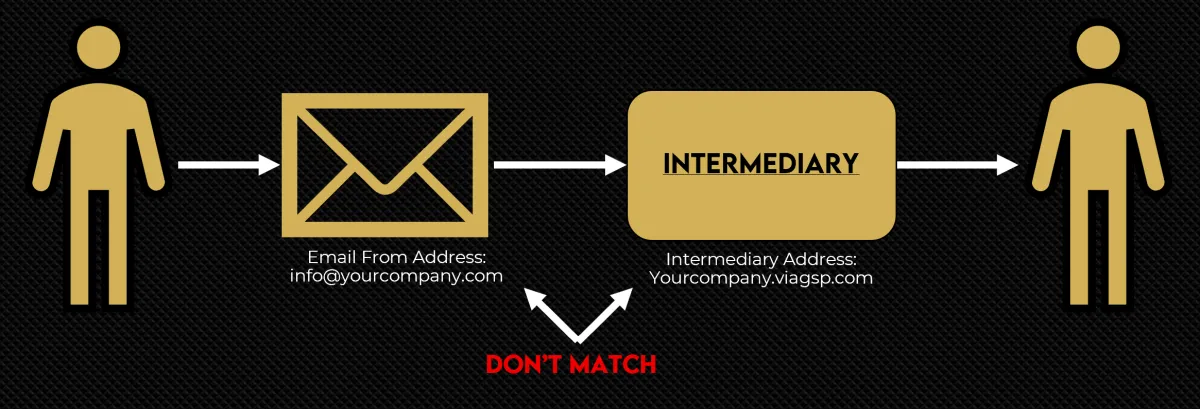
LET US HELP YOU GET BETTER DELIVERABILITY!
With that said, we'd like to invite you to create a custom sender domain using YOUR domain... that is, on the same domain as your email address.
When your email address ie. [email protected] matches your delivery path ie. reply.yourdomain.com we avoid this red flag, and YOU land in more inboxes.
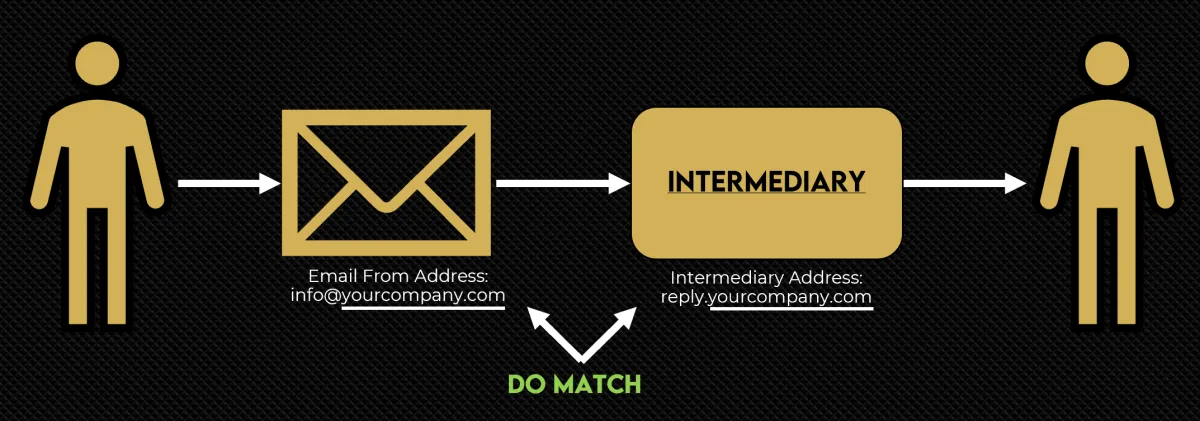
THIS IS NOT OPTIONAL
It doesn't matter which platform you use, this is now MANDATORY.
This is not something asked of you by Gold Star Pro... this is required by the likes of Google and Yahoo.
The benefit for you is that we help you do this... FOR FREE. (Other companies are charging big $$$ to set this up!)
With that said, I'd like to invite you to work with us to set up a custom domain for your company, and help you land in more inboxes.
But what exactly does that mean?
To set up a custom sender domain, you'll need to do 3 things.
Fill out our request form.
Set up 6 new DNS records (similar to what you've likely done previously to point your domain to Gold Star Pro)
Notify us via an email link that the records are set up.
That's it!
And we'll even provide instructions on how to do this for the major Domain Providers.
And if you get stuck, you can always reach out to us in the FB group for help!
Ready to Get Started?
Click the button below